 Chat with Us

Introducing Pseudo Trunk Technology in Hytera Two-Way Radios
️ Understanding “Pseudo Trunk” on the Hytera BP518 / BP568 — A Technology That Optimizes Communication Channels
Introduction
In digital radio communication systems, using frequency efficiently is always a key challenge — especially in high-traffic environments such as factories, hotels, construction sites, or security teams. With the Hytera BP518 / BP568 digital two-way radios, users get clear audio and strong security, plus a smart feature called Pseudo Trunk.
What is Pseudo Trunk?
Pseudo Trunk (PTT) is a smart mechanism on DMR (Digital Mobile Radio) two-way radios that automatically picks an available time slot to transmit voice signals, without needing a repeater station like traditional trunking systems.
The concept, simplified:
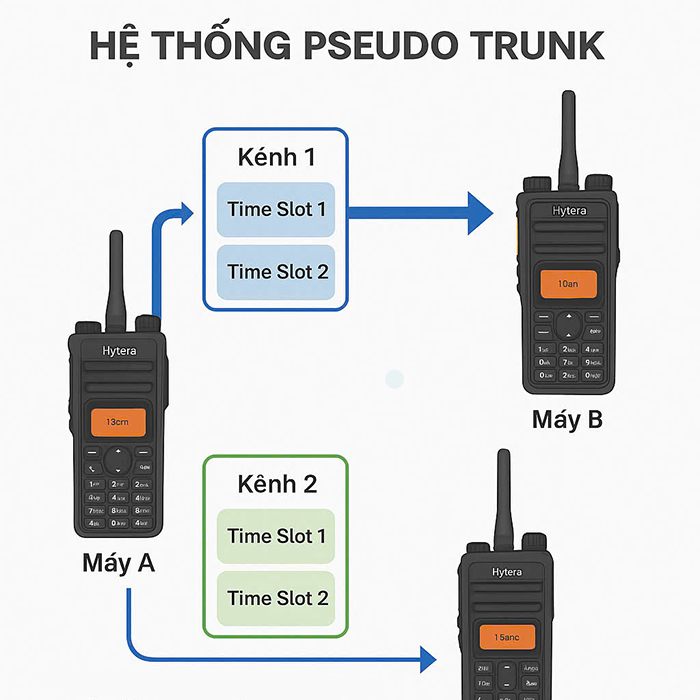
Carry 2 simultaneous calls on the same frequency without a repeater, thanks to splitting the frequency into 2 time slots (DMR Tier II TDMA).
⚙️ How Pseudo Trunk works
In DMR Tier II, each channel is divided into 2 time slots:
- Slot 1 and Slot 2 operate alternately in time (2-slot TDMA).
- Normally, users are pre-configured to use one specific slot.
With Pseudo Trunk, however, when someone presses PTT to transmit:
- The two-way radio automatically checks which slot is free.
- It selects the free slot to transmit on.
- This significantly reduces channel congestion when many users share the same channel.
Pseudo Trunk on the Hytera BP518 / BP568
The Hytera BP518 and BP568 are compact handheld DMR digital two-way radios that support both analog and digital modes, with Pseudo Trunk integrated even when no repeater is present.
Specific benefits:
Two people can talk simultaneously on the same frequency — each on a different slot. Doubles the efficiency of frequency use. Reduces transmission latency since there is no need to wait for a fixed slot.
No complex setup required — just enable the Pseudo Trunk function in the software.
️ How to activate Pseudo Trunk
- Connect the two-way radio to a computer using the Hytera programming cable.
- Open Hytera CPS (Customer Programming Software).
- Go to Digital Channel > Edit Parameter.
- Enable the Pseudo Trunk Mode option.
- Save the configuration and reload it onto the two-way radio.
Note: Both the transmitting and receiving radios must have Pseudo Trunk enabled for it to work correctly.
Real-world applications
In hotels: security teams, housekeeping, and reception can all call at the same time without channel congestion.
On construction sites: two work crews share a single frequency yet can still talk separately, making the most of the equipment.
In event security: monitoring, security, and logistics groups can communicate simultaneously without investing in a repeater.
❓ Comparing Pseudo Trunk with true Trunking
| Criterion | Pseudo Trunk | Trunking (DMR Tier III) |
| Infrastructure | No repeater required | Requires a central repeater |
| Physical channels | 1 channel (split into slots) | Multiple coordinated channels |
| Cost | Low | High |
| Best fit | Small businesses, security teams, hotels | Large-scale systems, utilities, transportation |
Summary
The Pseudo Trunk feature on the Hytera BP518 / BP568 is an excellent tool for boosting communication efficiency, reducing channel congestion, and getting the most out of your equipment investment. It is the ideal solution for organizations that need a smart communication system but cannot justify deploying full trunking.